Broadcaster Demo
The package comes with a sample project that illustrates how to use the Broadcaster features in real situations.
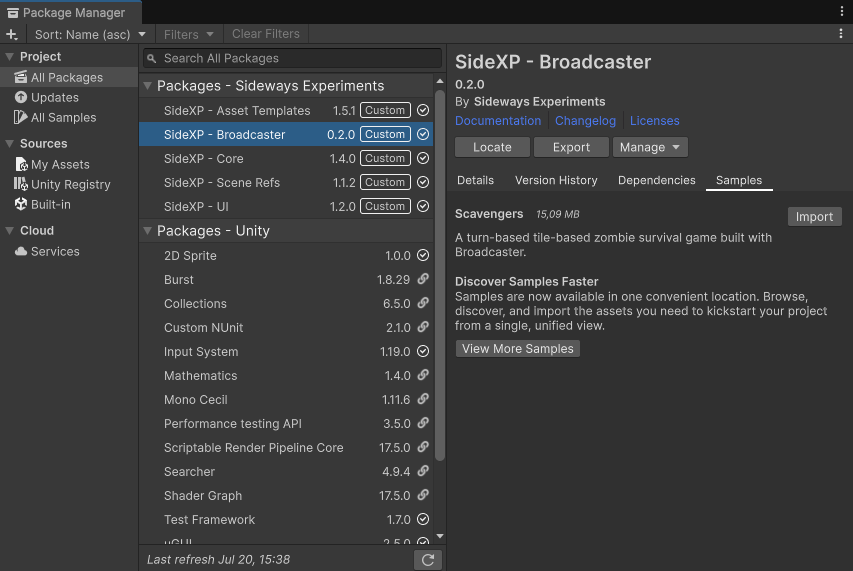
You can import it from the Packages Manager window:
- In your Unity project, go to
Window > Package Management > Package Manager - Select SideXP - Broadcaster in the packages list
- Click on the Samples tab
- Import the Scavengers project
This will install the sample files into your Assets folder.
The game concept
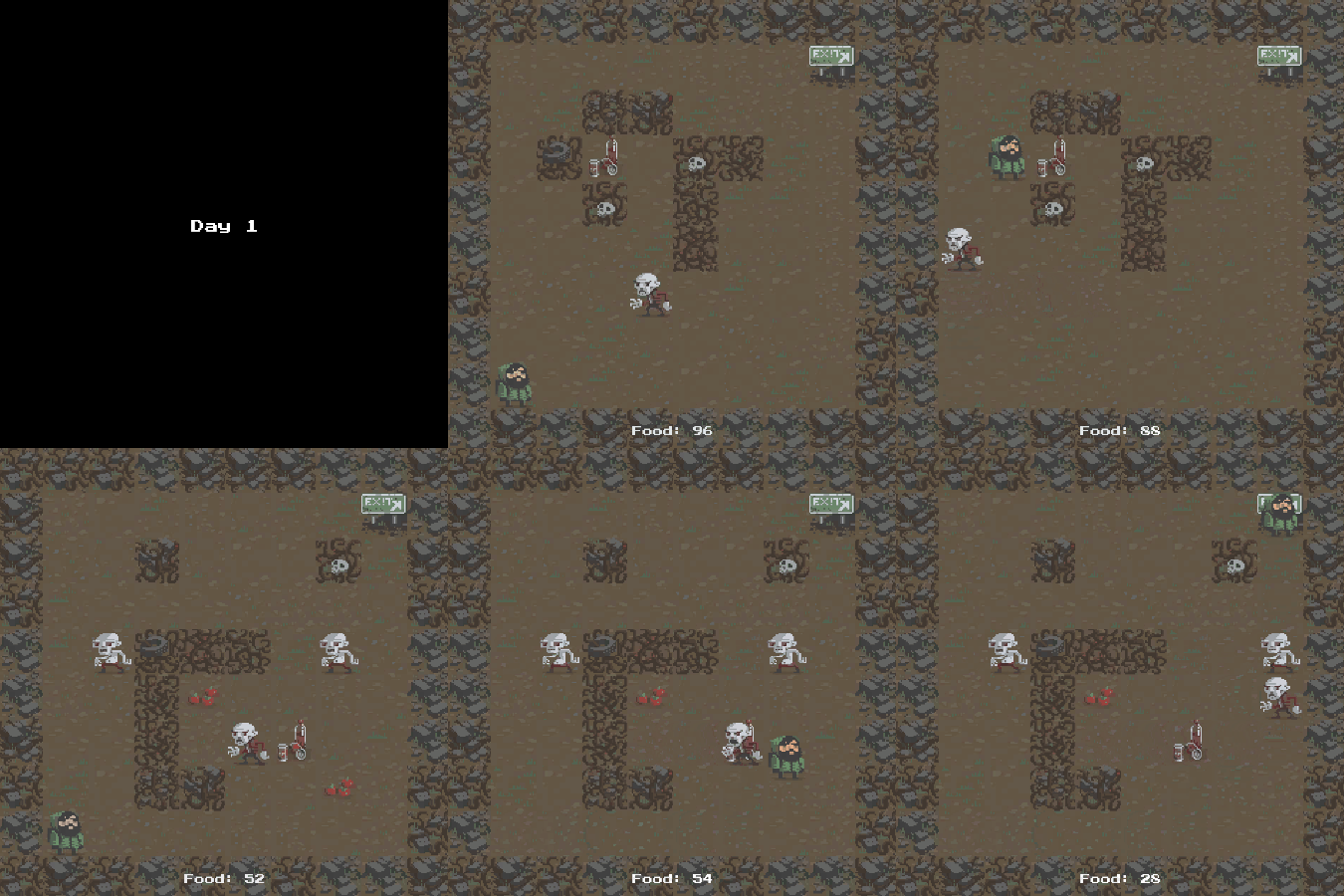
The game is a turn-based tile-based roguelike where the player must survive incoming zombies.
In short:
- The player can move by pressing arrow keys
- Each movement is a turn and 1 Food
- Running out of food is game over
- Enemies can also move after player turn, and attack the player if in range
- Enemy hits decrease food
- Move on a tile with food grants +10 food, soda grants +20 food
- Enemies can't be defeated, and will increase in number as the player progresses
- Reach the Exit panel to go to the next level
The concept come from an old Unity tutorial. We reused their scripts and assets, but reworked it with Broadcaster features.
For reference, and for comparison, the original scripts (before any integration of Broadcaster) are available in the
Originalfolder of the sample project. We only reworked them so you don't need to setup anything for running the demo (eg. tags, layers, ...).
Reworking with Broadcaster
Broadcaster lets a system announce that something happened, or ask another system to do something, without holding a reference to whoever handles it. Systems no longer wire themselves to each other. Instead, they exchange events, and the kind of event you pick (a signal, a command, a request, a cue) is a deliberate contract about what a listener is allowed to do with it.
The rework introduces those kinds one at a time, each solving a concrete coupling problem in the original tutorial code. Each section presents a problem, then shows how Broadcaster features solve it.
Signals - Making the audio system independent
A signal (ISignal) is a fire-and-forget notification. It can have any number of listeners or none. It's the lightest event kind, and the right tool whenever a system just needs to announce that something happened and doesn't care who, if anyone, reacts.
The problem
In the original code, audio is a SoundManager singleton, and gameplay plays sounds by reaching for it directly:
// Original Player, Enemy and Wall all do this:
SoundManager.instance.RandomizeSfx(moveSound1, moveSound2);
Player calls it in three places, Enemy and Wall once each. Worse, the game-over path reaches through the singleton into one of its fields:
// Original Player.CheckIfGameOver
SoundManager.instance.PlaySingle(gameOverSound);
// Player knows SoundManager owns an AudioSource named musicSource
SoundManager.instance.musicSource.Stop();
Three things are wrong here:
- Delete
SoundManagerand three unrelated systems break.Player,EnemyandWallall depend on an audio class to do their own job. - Gameplay owns the sounds. Each of those scripts carries
AudioClipfields (moveSound1,chopSound1, …) and decides what a move or a chop sounds like. So audio is smeared across the gameplay code. - Player has an additional hard dependency. In the original code,
Playeritself stops the music when it dies (a job that isn't really the player's), which ties it even more tightly to the audio system.
Broadcaster's solution
Flip the dependency. Gameplay emits a signal that describes what happened; the audio system listens and plays the appropriate sound. Nothing calls the audio system anymore, so nothing breaks when it's gone.
The core idea behind signals is to announce what happened, not what should be done about it.
In our case specifically, don't write a PlaySfx struct that carries an AudioClip. That would only solve the problem partially: Player, Enemy and Wall would still have to own the AudioClip fields. Instead, implement a PlayerMoved signal with no payload. The audio system is then responsible for listening for that signal and playing the appropriate sounds, which it owns. We can then remove the moveSound fields from Player, making the two systems independent.
Repeat the process for the other signals and sounds, and you'll be able to completely remove the audio system from the scene without breaking anything. Plus, if you later replace the audio system with a third-party solution such as FMOD, the swap is painless, since audio is already completely decoupled from the rest of the game!
The implementation
1. Declare the signals. Each is a small type implementing ISignal. The [Event(...)] attribute is optional (it's meant for documentation purposes), so it's worth filling in as you introduce each type:
[Event("The player successfully moved to an adjacent tile.")]
public struct PlayerMoved : ISignal { }
The audio rework needs six (none of them carrying a payload), since the audio system only needs to know that each one happened:
| Signal | Emitted when… |
|---|---|
PlayerMoved |
the player moves to a free tile |
PlayerAte |
the player picks up food |
PlayerDrank |
the player picks up soda |
WallChopped |
the player damages a wall |
EnemyAttacked |
an enemy hits the player |
PlayerDied |
the player runs out of food |
2. Emit them from gameplay, at the moment each thing happens, in place of the old SoundManager.instance.* calls:
Food and soda need different sounds, but both are a single
Collectiblecomponent. So the collectible carries akind, andPlayeremits the matching signal (PlayerAteorPlayerDrank) without the audio system ever seeing a collectible.
3. Make SoundManager a pure listener. It subscribes to every signal in OnEnable, releases everything in OnDisable, owns all the clips, and keeps RandomizeSfx/PlaySingle private:
private void OnEnable()
{
    Broadcaster.Subscribe<PlayerMoved>(this, _ => RandomizeSfx(moveSound1, moveSound2));
    Broadcaster.Subscribe<PlayerAte>(this, _ => RandomizeSfx(eatSound1, eatSound2));
    // …one Subscribe per signal, each a small inline lambda
}

private void OnDisable()
{
    // The blessed one-liner: drop every registration owned by this object.
    Broadcaster.UnregisterAll(this);
}
The musicSource.Stop() that used to live in Player moves here too, into the PlayerDied handler where it belongs — stopping the music is the audio system's business, not the player's.
A subtlety worth knowing: the bus dispatches on the exact type you emit.
Broadcaster.Emit(new PlayerMoved())is fine, but emitting through a variable typed asISignalwould reach no listener (and log a development-time error). Always emit the concrete type.
The payoff
Delete the SoundManager from the scene and press Play: the game runs exactly as before, with no errors — just silent. That single test is the proof that no system depends on the audio system.
And feedback is now purely additive. Want a particle when the player eats? Add a listener on PlayerAte; it touches no gameplay code, and the existing sound listener never notices the second one.
Signals - Feeding the UI
The audio rework used signals to remove a dependency. The UI rework uses the same vent kind for a different lesson: fan-out. One signal can have any number of listeners, none of them aware of the others, so presentation stops being something gameplay code owns, and becomes something any number of systems can hang off the facts gameplay announces.
The problem
Two different smells, both about the UI leaking into gameplay.
First, Player formats its own presentation. It holds a Text reference and builds display strings by hand, in three different places:
// Original Player
public Text foodText;
// …on a move:
foodText.text = "Food: " + food;
// …on a pickup:
foodText.text = "+" + collectible.points + " Food: " + food;
// …on a hit:
foodText.text = "-" + loss + " Food: " + food;
The player script decides what the HUD says and how it's punctuated. Change the wording, or add a second thing that should react to food changing, and you're editing gameplay code.
Second, GameManager finds its UI by name:
// Original GameManager.InitGame
levelImage = GameObject.Find("iLevelImage");
levelText = GameObject.Find("tLevelText").GetComponent<Text>();
Rename a scene object and the game compiles, runs, and silently fails to show the level card. The dependency is real but invisible to the compiler.
Broadcaster's solution
Gameplay announces facts. A dedicated UI system listens and owns everything about how those facts are shown. Same rule as the audio section (broadcast what happened, not what to do about it) applied to presentation.
The facts here carry a payload, because the UI needs the values:
| Signal | Payload | Emitted when… |
|---|---|---|
FoodChanged |
current, delta, source |
the player's food total changes |
LevelStarted |
level |
a new level begins |
RunEnded |
level |
the player starves |
The interesting one is FoodChanged. Notice it does not carry a formatted string, or even a "should I show a badge?" flag. It carries source, an enum saying why the food changed (a Move, a Pickup, Damage):
public enum FoodChangeSource { Move, Pickup, Damage }

public struct FoodChanged : ISignal
{
    public int current;
    public int delta;
    public FoodChangeSource source;
}
That distinction is the whole discipline in miniature. Whether a move shows a quiet Food: 99 while a hit shows -5 Food: 95 is a presentation decision, and it lives in the HUD. Gameplay only reports the fact and its cause. Because the cause is on the payload rather than baked into a display string, any other listener (eg. an achievement tracker counting damage taken, a tutorial highlighting pickups, …) can branch on the same source without gameplay knowing they exist.
The implementation
1. Emit facts instead of writing text. Player loses its Text field entirely and emits FoodChanged at each of the three sites:
// A move
Broadcaster.Emit(new FoodChanged { current = food, delta = -1, source = FoodChangeSource.Move });
// A pickup
Broadcaster.Emit(new FoodChanged { current = food, delta = collectible.points, source = FoodChangeSource.Pickup });
// A hit (in LoseFood)
Broadcaster.Emit(new FoodChanged { current = food, delta = -loss, source = FoodChangeSource.Damage });
2. GameManager stops knowing the UI exists. The GameObject.Find calls and every levelText/levelImage reference go away, replaced by two announcements:
// InitGame
Broadcaster.Emit(new LevelStarted { level = level });
// GameOver
Broadcaster.Emit(new RunEnded { level = level });
3. A GameHUD listens and owns presentation. It subscribes to the three signals, holds the scene references (assigned in the inspector, not looked up by name), and decides all formatting, including the "quiet on moves" rule, expressed cleanly against source instead of guessed from the delta:
private void OnFoodChanged(FoodChanged signal)
{
    if (signal.source == FoodChangeSource.Move)
        foodText.text = "Food: " + signal.current;
    else
        foodText.text = (signal.delta >= 0 ? "+" : "") + signal.delta + " Food: " + signal.current;
}
A note on timing.
GameManagerkeeps its own short setup delay as a gameplay gate (enemies mustn't move while the level card is up), and theGameHUDseparately owns how long the card actually stays on screen. That's two timers describing one beat, a smell we leave in place on purpose. The cue section resolves it: the game will wait for the UI's intro to finish rather than run a parallel stopwatch.
Fan-out
With this in place, PlayerAte now has one listener (the sound from the previous section), and could have more. That's fan-out, and it's the point of this section: a designer who wants a HUD flash when the player eats adds a listener on PlayerAte; a designer who wants a particle adds another. Neither touches gameplay, and neither touches the other (the emitter has no list of subscribers to update), because it never knew there was a list. Presentation grows by addition, never by editing the thing that announced the fact.
Deliberately left unfinished
Note that there's a rough edge on purpose.
FoodChangedonly fires on a change, so a HUD that comes up at the start of a level has nothing to show until the player's first move. It means that the initial food total has nowhere to come from.Player.Start()used to set that text directly, but now it can't, and emitting a fake "change" of zero to seed it would be dishonest. That gap is the hook into the next real problem. The food total isn't an event: it's state, something a newly-spawned listener should be able to ask for, not wait to be told about. That's what providers are for, and it's where we go next.
Commands - Giving the verbs
A command (ICommand) is an order, performed by exactly one handler. Where a signal announces what happened and lets anyone (or no one) react, a command names something to be done and expects one authoritative party to do it. That "exactly one" isn't a limitation to work around, it's the whole contract.
The problem
Two spots where gameplay reaches through a concrete type to make something happen.
Ending the run, from Player:
To end the run, Player has to know GameManager exists, that it's a singleton, what its method is called, and compile against it. Anyone who wants "stepping on a lava tile ends the run" can't express that without writing gameplay code.
Hurting the player, from Enemy:
// Original Enemy.OnCantMove
Player hitPlayer = component as Player;
hitPlayer.LoseFood(playerDamage);
Anything that wants to damage the player must first find a Player and know its API. The enemy is coupled to the player's concrete type just to subtract some food.
Broadcaster's solution
Turn the verb into a type, and let whoever owns the action handle it. The caller orders the command, it never learns who performs it or how.
The ICommand contract is exactly one handler, and that's a promise the developer makes to everyone else: there is one authoritative implementation of "end the run", a second registration is refused, and it can't be quietly bypassed. The designer's entire vocabulary for ending the run collapses to a single type name (no reference, no singleton, no method to look up).
This is also where the kind you pick is a permission. A signal says "you may react to this." A command says "you may trigger this verb, but you don't get to know or change how it's done." Handing a designer EndRun is safe in a way that handing them GameManager is not.
The implementation
1. Declare the commands. Small types, like signals, but implementing ICommand:
[Event("End the current run (starvation, a lethal tile, a debug shortcut, ...).")]
public struct EndRun : ICommand { }

[Event("Damage the player, reducing its food by amount.")]
public struct DamagePlayer : ICommand
{
    public int amount;
}
2. Register the one handler, with Obey. GameManager becomes the authority on ending the run, and Player on taking damage:
// GameManager, the sole handler that ends the run
Broadcaster.Obey<EndRun>(this, _ =>
{
    Broadcaster.Emit(new RunEnded { level = level });
    enabled = false;
});

// Player, the sole handler that damages the player (what LoseFood used to do)
Broadcaster.Obey<DamagePlayer>(this, command =>
{
    animator.SetTrigger("hit");
    food -= command.amount; // then refresh the HUD and check for game over
});
The old public GameOver() and LoseFood() methods fold straight into these handlers. Nobody calls them by name anymore.
3. Order the command where the old call used to be. Player.CheckIfGameOver orders EndRun. Enemy.OnCantMove orders DamagePlayer and drops its Player cast entirely.
Registering the single handler over an object's lifetime. A handler is owned, so it's registered and released with its owner.
Playerdoes it inOnEnable/OnDisable(it's rebuilt every level), and because the outgoing player releases before the incoming one registers, the "exactly one" rule holds across a scene reload.GameManagerusesAwake/OnDestroyinstead, deliberately notOnEnable/OnDisable, because it flips its ownenabledoff at game-over, and anOnDisablerelease would drop theEndRunhandler exactly when the run is ending.
The contract: silence versus error
Signals and commands fail in opposite ways, and both are correct.
- An unhandled signal is silence. Nobody listening for
PlayerMoved? Nothing happens, and that's fine. The emitter never cared. - An unhandled command is a loud error.
Order-ingEndRunwith no handler logs an error (in the editor and development builds) and reports the command as unperformed.
The asymmetry is the point: nobody caring that the player moved is normal, but nobody performing "end the run" is a bug, and the bus treats it as one. Registering a second handler for a command is refused the same way: the first stays authoritative, so a command can never fork into two conflicting implementations.
The designer payoff
Two concrete wins, neither hypothetical.
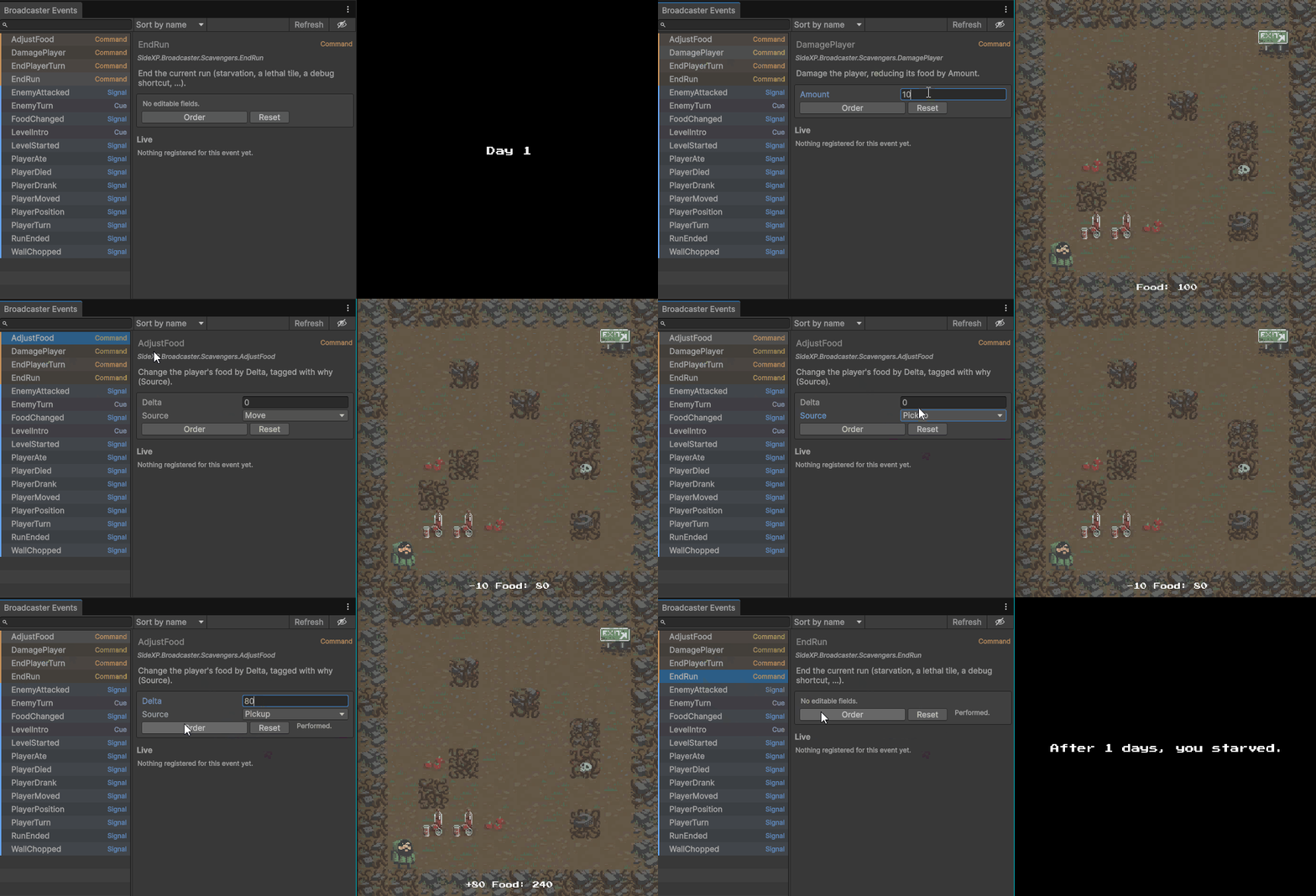
Test game-over without dying. Open the Events window (Tools/Sideways Experiments/Broadcaster/Events) in play mode, find EndRun, and fire it. The game-over screen appears, no starving first. Because the whole action is reachable through one type, the tooling can drive it directly, and so anyone in the team can.
Author a hazard with zero gameplay knowledge. A TrapTile that ends a turn on the player's food is now a few lines that mention nothing about Player:
public class TrapTile : MonoBehaviour
{
    public int amount = 5;
    private void OnTriggerEnter2D(Collider2D other)
        => Broadcaster.Order(new DamagePlayer { amount = amount });
}
There's no Player to find, no API to learn, no reference to wire. The command is the interface, and it's the narrow, safe one the developer chose to expose.
Providers - Owning shared state
A provider answers one question: what is the current value of this piece of state? Where a signal announces a change and a command performs a verb, a provider exposes state: readable by anyone, writable by no one but its owner. A reader pulls the current value and holds no reference to whoever owns it, so it can read without gaining the power to corrupt.
The problem
Three cross-system reads, each done today by reaching for a concrete object.
Food has two owners. It lives in Player during a level and in GameManager between levels, kept in sync by lifecycle timing:
// Original Player
private void Start()     => food = GameManager.instance.playerFoodPoints; // read forward
private void OnDisable() => GameManager.instance.playerFoodPoints = food;  // write back
One value, two homes, synchronised by the hope that OnDisable runs before the scene reloads.
This is the same seam the UI section deliberately left broken: a freshly spawned HUD had no value to show.
Turn state is a public mutable bool, polled every frame. Player.Update reads GameManager.instance.playersTurn, and because it can read it, it can write it, and does:
// Original Player
if (!GameManager.instance.playersTurn) return;  // polled in Update
GameManager.instance.playersTurn = false;       // …and written in AttemptMove
Reading state you don't own shouldn't hand you the power to corrupt it.
The player is found by tag. Enemy caches a hard reference located by magic string:
Broadcaster's solution
Give each piece of state a single owner that provides it. Readers pull; they can't mutate, and they hold no reference. The pattern is uniform:
The owner
Provides the current value (andEmits the type when it changes). A reader eitherSubscribes withinit: true(current value now, plus every change after) or callsTryGetCurrentfor a one-shot read.
The provider is a Func<T> invoked lazily, so the value is never stale, and it's released with its owner.
The implementation
Food: GameManager owns it. The value has to outlive the level, and the Player doesn't, so the persistent manager is the honest owner. Player stops holding food entirely. It orders the change, and GameManager applies it, announces it, and detects starvation:
// Player (no food field anymore)
Broadcaster.Order(new AdjustFood { delta = -1, source = FoodChangeSource.Move });

// GameManager (the single owner)
Broadcaster.Provide<FoodChanged>(this, () => new FoodChanged { current = playerFoodPoints, source = FoodChangeSource.Move });
The HUD reads it back by subscribing with init: true, which pulls the current food the moment it subscribes:
That's the read mechanism. The reliable seed at level start comes from the owner announcing it (covered just below). Either way, the counter the UI section left blank now shows the right number, including the carried-over total on level 2 and beyond.
Turn state: GameManager provides, Player subscribes. The poll becomes a push, and the write disappears:
// GameManager
Broadcaster.Provide<PlayerTurn>(this, () => new PlayerTurn { active = playersTurn });
// Player (cache the pushed value instead of polling every frame)
Broadcaster.Subscribe<PlayerTurn>(this, signal => myTurn = signal.active, init: true);
Player can no longer write the flag, that was the point. To end its turn it orders a command, and GameManager, the owner, flips the state and emits the new value:
Player position: Player provides, Enemy asks. The enemy stops caching a Transform and pulls the current position each turn:
// Player
Broadcaster.Provide<PlayerPosition>(this, () => new PlayerPosition { position = transform.position });

// Enemy.MoveEnemy
if (!Broadcaster.TryGetCurrent(out PlayerPosition player))
    return; // the player is gone; skip the turn
// …path toward player.position
That single change deletes FindGameObjectWithTag and the last thing the sample read from a tag.
Establishing the starting state. A provider only answers when asked, so a subscriber that came up before the owner's provider was ready would miss its init pull and see nothing. In this sample that's a real risk: GameManager is spawned by a Loader, so the scene's subscribers can initialize before it. The fix is to have the owner establish each level's starting state in one place and announce it:
// GameManager.InitGame (runs from sceneLoaded, after every subscriber's OnEnable)
SetPlayersTurn(true);                                                                             // the player acts first
Broadcaster.Emit(new FoodChanged { current = playerFoodPoints, source = FoodChangeSource.Move }); // seed the HUD
Because this runs after everyone's OnEnable, no subscriber present at level start misses it. init: true and TryGetCurrent then cover the other case: reading the current value on demand, or when a system joins mid-game, which is exactly how the enemies pull PlayerPosition each turn. The rule of thumb: the owner announces state when it's established; readers pull it when they need it.
Why providers, and not requests
There's a fourth event kind we haven't used: the request (IRequest<T>). "Where is the player?" sounds like a question, so why is it a provider?
Because every cross-system read in this game is "what is the current value of some state?", and that's exactly what a provider is for. A request is for a computed, parameterized or even asynchronous answer: IsWalkable { Vector2Int position }, PathTo { Vector2Int goal }, a question that takes arguments and recomputes each time it's asked. This Scavengers demo has none. Even walkability is a physics linecast that MovingObject runs on itself; no other system ever asks it.
If your game does have a genuine query ("is this tile walkable?", "what's the shortest path?") that's what Answer/Ask are for: the same single-handler contract as a command, but side-effect free, because asking a question must never change the answer.
The payoff
- The food counter is correct on every level start, seeded by the owner announcing it, not by a fragile hand-off.
- Turn state is readable everywhere and writable only by its owner: "reading it" no longer means "you can break it."
- No
FindGameObjectWithTag, no tags at all, so no hidden project setup
Cues - Handing the clock
A cue (ICue) is a beat the game waits for. Like a signal it can have any number of performers, or none. But unlike a signal, sending a cue doesn't complete until every performer has finished. It's the tool for "this moment happens, and the game pauses on it until everyone's done".
The problem
GameManager runs the enemy turn by guessing how long each enemy takes:
// Original GameManager.MoveEnemies
enemies[i].MoveEnemy();
yield return new WaitForSeconds(enemies[i].moveTime);
It never waits for the enemy to actually finish: it waits for moveTime, a public field it reads and treats as a duration. But the real movement is SmoothMovement, a coroutine that can drift from that number. The wait is an estimate standing in for a completion signal.
The deeper problem is who owns the timing. The turn manager decides how long the enemy turn takes, so a designer who wants a death animation, a hit-flash, or a camera shake on the enemy turn must either make it fit the existing window and hope, or edit GameManager's coroutine. Pacing is the designer's job, and it's locked inside gameplay code.
Broadcaster's solution
The developer declares the beat ("the enemy turn happens, and the game waits for everyone") and awaits it. Anyone can hang a reaction on it, and the cue doesn't complete until the slowest one does.
// GameManager, on the enemies' turn
await Broadcaster.Cue(new EnemyTurn());
// …only now is it the player's turn again
Nothing here knows how many performers there are, how long each takes, or what they do. The turn ends when the last one reports finished (measured, not estimated).
The implementation
The enemies are the performers. Each enemy joins the cue in OnEnable and reports completion only when its move or attack has actually finished:
// Enemy
private void OnEnable() => Broadcaster.Perform<EnemyTurn>(this, (_, done) => StartCoroutine(TurnRoutine(done)));
private void OnDisable() => Broadcaster.UnregisterAll(this);

// Starts this coroutine, handed a `done` to call when it's finished
private IEnumerator TurnRoutine(Action done)
{
    // …decide a direction toward the player…
    if (CanMove(xDir, yDir, out Vector2 end, out RaycastHit2D hit))
        yield return StartCoroutine(SmoothMovement(end)); // wait for the real slide
    else if (/* the player is in the way */)
        { /* order the damage, play the attack */ yield return new WaitForSeconds(attackTime); }

    done(); // the cue's when-all waits for this
}
yield return StartCoroutine(SmoothMovement(end)) is the whole fix: the performer completes when the animation is genuinely over, not after a guessed number. Note that a performer can also be a plain async Awaitable if you prefer. The enemy uses the coroutine-plus-done shape because its movement already lives in a coroutine.
The performer registry is the enemy list. This is the best structural moment in the sample. The old code kept a List<Enemy>, an AddEnemyToList method each enemy called on spawn, and a loop over that list. All three are gone: the enemies are the set of EnemyTurn performers. They add and remove themselves with their own lifecycle, and GameManager never holds a reference to a single one. Sending the cue reaches exactly the enemies that are alive.
This introduces
async.GameManager.RunEnemyTurnisasyncandawaits the cue across frames. It passes the manager'sdestroyCancellationToken, so exiting play mode mid-turn unwinds cleanly instead of throwing.
Make when-all observable. With every enemy taking the same time, when-all looks identical to a plain loop. So the sample gives enemies genuinely different durations: a StrongZombie slides slower than a Zombie, and attacking takes longer than moving. Now you can watch it: the fast zombies stop, and the player's turn still doesn't return until the slow one (or the attacker) has finished.
The designer payoff
EnemyTurn is a beat anyone can decorate. A designer who wants the screen to shake on the enemy turn writes a performer and hangs it on the cue, without touching the gameplay code:
public class ScreenShake : MonoBehaviour
{
    private void OnEnable() => Broadcaster.Perform<EnemyTurn>(this, Shake);
    private void OnDisable() => Broadcaster.UnregisterAll(this);

    // The cue waits for this to return
    private async Awaitable Shake(EnemyTurn cue)
    {
        // …shake the camera for a moment…
    }
}
The game now waits for the shake, because it's a performer like any other. Delete the component and the turn speeds back up. That gesture (adding and removing feedback that the game's pacing respects, with zero gameplay edits) is the whole thesis of Broadcaster in one move, and it only lands because of the steps before it.
A second beat: the level intro
The enemy turn isn't the only place the game guessed a duration. The "Day N" level card did too, and it hid a duplication the UI section deliberately left in place: two timers for one beat. GameManager ran an Invoke(EndSetup, levelStartDelay) to gate setup, while the HUD ran its own Invoke(HideLevelImage, levelStartDelay) to hide the card. Two independent stopwatches that had to be kept in agreement.
A cue collapses them. The HUD performs LevelIntro, so it alone owns how long the card stays up, and GameManager awaits it instead of running a stopwatch of its own:
// GameHUD — the intro's duration lives here, and only here (a coroutine, like the enemy performer)
private IEnumerator LevelIntroRoutine(Action done)
{
    yield return new WaitForSeconds(levelStartDelay);
    levelImage.SetActive(false);
    done(); // setup's Cue await unblocks here
}

// GameManager.InitGame — no parallel delay; it waits for the UI's actual intro
await Broadcaster.Cue(new LevelIntro());
It's the same tool as the enemy turn (a single-performer beat instead of a crowd) but it's the payoff the UI section promised: one duration, owned by the UI, and gameplay that waits for the real thing rather than a number it hoped would match.
The trade-off, named
The cue is the most powerful permission on the ladder, and the only one where a performer can hurt you: one that never calls done() never completes, and the turn waits on it forever. Broadcaster softens this (unregistering a performer resolves its slot, cancellation fans out, a throwing performer is isolated) but it can't eliminate it. The power to control the game's timing is the power to stall it, so hand ICue out deliberately.