Listener Component
This component allow you to listen for a Signal or a Cue and "convert" it into a parameterless UnityEvent so you can bind functions to it wwithout creating a new script.
This should be used only for feedbacks. You should avoid using events and bindings in the editor for your game logic.
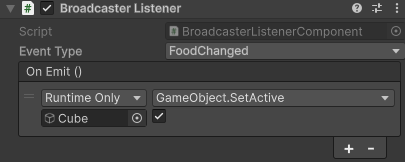
Adding it
Add the component to any GameObject:
Add Component > Sideways Experiments > Broadcaster > Broadcaster Listener
It exposes two fields:
- Event: the signal or cue to react to, chosen from a picker (below).
- On Emit: a parameterless
UnityEventinvoked each time that event is sent. Wire it as you would anyUnityEvent: drag a target object, pick a component method, set its arguments.
Picking the event
The Event field is a dropdown. Clicking it opens a searchable picker of every signal and cue in your project, grouped under Signals and Cues, plus a (None) entry to clear the field:
- Type in the search box to filter by name.
- The button shows the selected event's display name once chosen, or (Missing type) if the referenced type no longer exists (for example, it was deleted).
The field stores the event's type, not a name string you could mistype, so a valid selection is always a real event.
How it behaves
- Signals: the
On Emitevent is invoked every time the signal is emitted, synchronously, on the main thread. - Cues: the component registers an instant performer. It runs the moment the cue is sent and completes immediately, so it never delays the cue's completion for the orchestrator awaiting it.
In both cases the reaction is payload-agnostic: On Emit takes no arguments, so it fires regardless of the event's fields. If you need the payload, write a script listener.
The component registers in OnEnable and unregisters in OnDisable, so disabling the component (or its GameObject) stops the reaction and re-enabling restores it. Registration uses the GameObject as its owner, so cleanup is automatic.